Every new user, role or permission change used to go through our support team. I designed a self-serve module where each client's admin sets up users, roles and teams on their own.
My scope: users, roles, teams and the delete flow · About 3 months, in 3 phases
User Management
One module · full client control
+ Add adminAL
Users24
AMAlex MorganSr UW
PNPriya NairHead
DCDaniel ChoJr UW
SRSofia RossiClearance
Roles4
Junior Underwriter12 users
Senior Underwriter7 users
Underwriting Head2 users
Clearance Specialist3 users
Teams3
London DeskEMEA
Singapore DeskAPAC
New York DeskAmericas
Users, roles and teams in one module. Interface recreated with sample data.
01 · Where it started
It worked when there was one line
When the platform was only Marine, most clients worked the same way. Our admin set up each client and created every user from the backend. Any change followed the same loop.
How a change happened
1Client needs a change
2Contacts our admin
3Admin asks the backend team
4Backend makes the change
5Back to the client
Even adding one new user followed this loop.
02 · The problem
Manageable for one line. Not for five.
As new lines and clients arrived, each with its own roles and permissions, the loop could not keep up. Everyone felt it.
Clients
Even small changes, like a new user or a role tweak, meant contacting our admin.
Every client had its own roles and needed different permissions, but could not set any of them.
Waiting on us for minor changes made for a poor experience.
Our admin
Set up every client and created every user by hand.
Passed every role or permission request to the backend team, then back to the client.
The workload grew with every new line and every new client.
Backend team
Pulled into role and permission changes that should never have needed engineers.
Client-specific changes kept piling up in the queue.
What it added up to
The cost
Every client change became our work
The more lines and clients we added, the more our admin and backend team became a bottleneck, and the longer clients waited for simple changes.
03 · The goal
What the new module had to do
Before designing anything, I set four tests the module had to pass, one for each part of the problem.
1Clients change things themselves
A client's admin should add users and change roles or permissions without contacting us.
2Every client works their own way
Each client should name its own roles, set its own permissions and organise its own teams.
3No engineers in the loop
A user, role or permission change should never need backend work.
4One module for every line
The same module should work for every line of business and every client, without changes.
04 · The process
How I got there
First we worked out what the module had to contain. Then we made sure it worked for every line and every client.
01 · What it needed
Three building blocks
We spoke with our internal teams and with clients about how they managed users today. It came down to three building blocks.
Team and user module
UsersFrom internal teams and clients
Create users
See every user in one list
User details
Assign a role
RolesFrom internal teams and clients
Create roles
Name them the client's way
Set permissions for each role
TeamsClient request
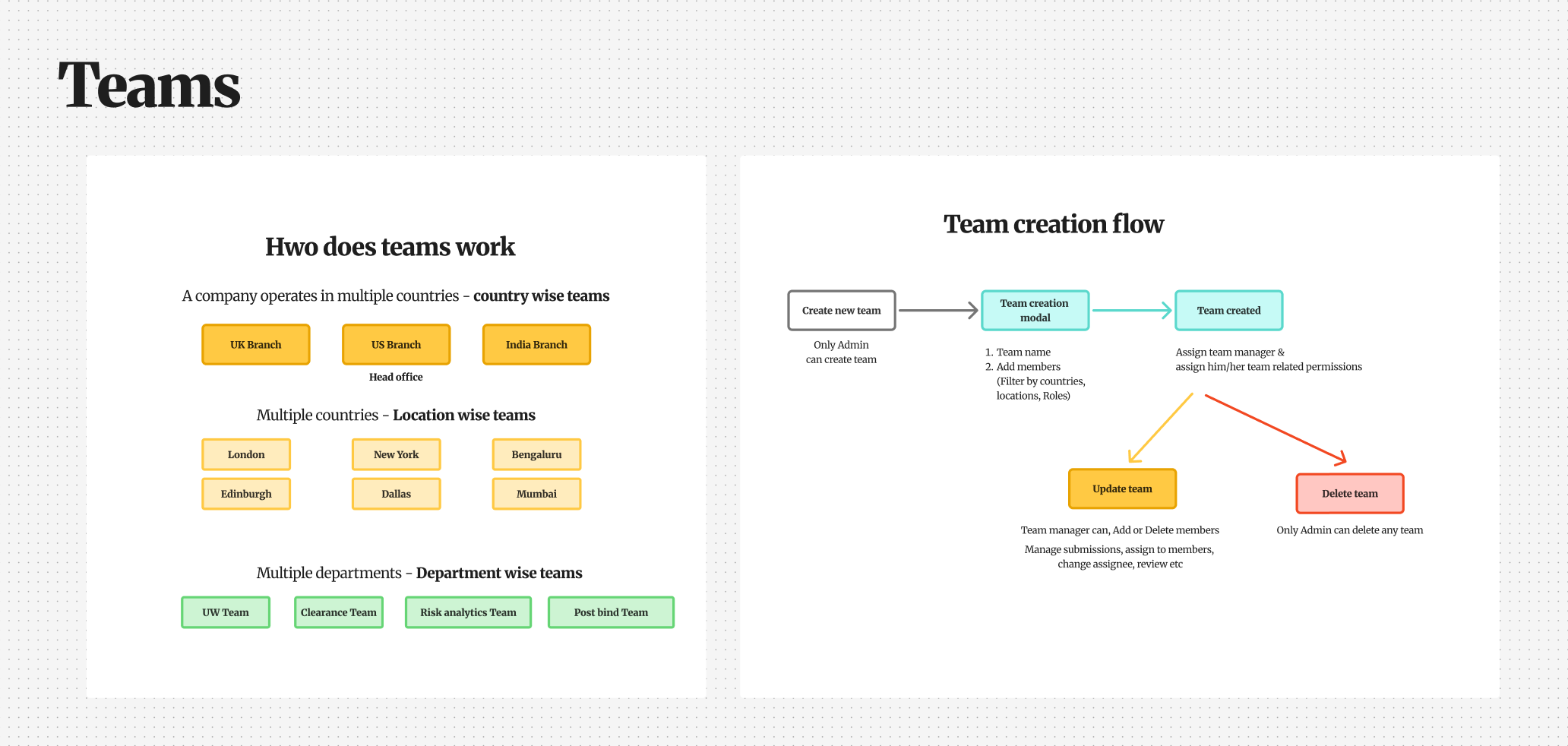
Group users into teams
Assign submissions to a team
Split teams by region or branch
Some clients already worked in teams, but managed them outside the platform. They wanted to assign submissions to a team, and split teams by region or branch.
02 · Every line, every client
Same job, different names, different rules
Marine, Aviation, PV&T and other lines each had their own roles and permissions. Inside each line, every client did it differently again.
Different roles per line
Each line of business had its own set of roles.
Different names for the same role
One client's "Senior Underwriter" was another's "Lead Underwriter".
Different team setups
Some clients split work between a clearance team and underwriters. Others had underwriters do everything.
Different permissions
Clients wanted to decide who could do what, like who could bind a policy.
Same job, three clients
Job
Client A
Client B
Client C
Senior underwriter
Senior Underwriter
Lead Underwriter
Underwriter II
Checks incoming data
Clearance Specialist
Submissions Analyst
Done by underwriters
Can bind a policy
Underwriting Head only
Senior and Head
All underwriters
Illustrative examples, not real client data.
The hard question
Could we ship a fixed set of default roles?
No. Fixed roles would never fit every line and every client. Each exception would send the client back to our admin, the same loop we set out to remove.
Instead of fixed roles, we built a flexible module. Each client designs its own setup inside it, and our team steps out after day one.
1
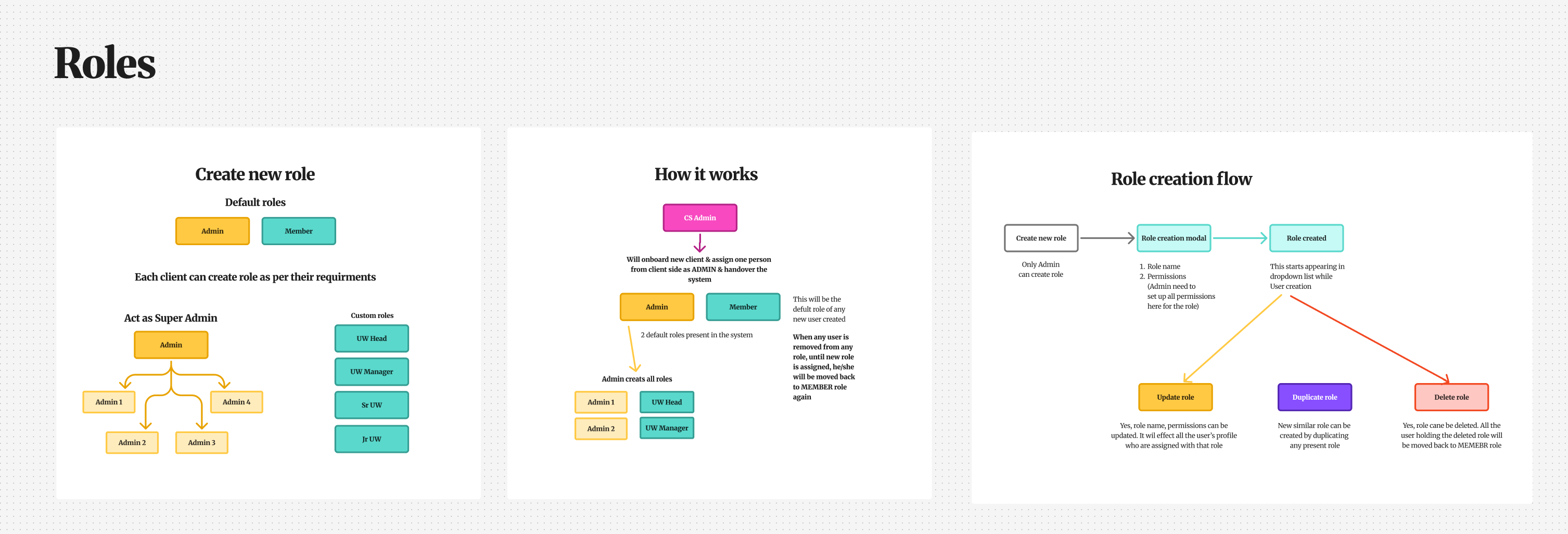
Day oneOur admin creates one client admin, with every permission.
2
HandoverThe client admin takes over.
3
Every day afterThe client admin creates roles, sets permissions, builds teams and adds users.RolesPermissionsTeamsUsers
Who does what
Task
Before
After
Set up a new client
Our admin, from the backend
Our admin creates one client admin
Add a user
Our admin
Client admin
Create or rename a role
Backend team
Client admin
Split a role into sub-roles
Not possible
Client admin
Change a role's permissions
Backend team
Client admin
Build teams by branch or region
Outside the platform
Client admin
Each client now designs its own setup, with its own role names, permissions and teams. Our admin's work at onboarding became one step, and the backend team stepped out of role and permission changes.
04 · The flow
Roles first, then users, then teams
I mapped the whole module as one flow. The order mattered: roles come first because they are assigned when a user is created, and teams are built from existing users.
The module took the load off our admin and backend team. But it all landed on one client admin, and for clients working across many locations, that was too much for one person.
One admin, everythingWork spread across levels
Who does what
1Super admin
The first client admin, created by our team. Has every permission. Creates other admins and decides what each can do.
2Admins
Created by the super admin, for a branch, a region or any split the client wants. Permissions are set by the super admin, up to full access.
3Team managers
Run their own team with extra permissions, like managing members and assigning submissions.
4Team members
Do the day-to-day work with the permissions their role gives them.
How the work is split is up to each client. We built the structure, and they decide how to use it.
Our admin, our backend team and now the client admin are all out of the bottleneck. Each client has a clear hierarchy, where everyone knows who does what.
06 · PrototypesA process I introduced
Working prototypes before final design
Instead of rough sketches, I built working prototypes with Figma Make and Google AI Studio, connected to our design system so they looked like the real product. People could click through real flows from the first review.
1PrototypeBuilt with Figma Make and Google AI Studio
2Internal reviewWith product managers across different lines and clients
3RefineChanges from every round of feedback
Repeat until it holds up
4Dev walkthroughWith the development team, to spot technical challenges early
5FinaliseThe final design
6Client previewShown to a few clients before launch
From the prototypes
Prototype
UsersAdd user
Name
Role
Team
Status
Alex Morgan
Sr UW
North
Active
Priya Nair
Head
West
Active
Sam Lee
Clearance
North
Invited
Dana Cole
UW
South
Active
Users list
Prototype
Create role
Role name
Senior Underwriter
Permissions
Submissions
Guidelines
Quote and bind
CancelSave role
Create role
Prototype
Underwriting NorthUK · North
PN
ManagerPriya Nair
Members · 4
AMAlex MorganSr UW
SLSam LeeClearance
DCDana ColeUW
RKRavi KumarUW
Team detail
Mid-fidelity recreations of the prototype screens.
Clickable prototypes meant product managers could test real flows against their own clients, and developers could flag technical limits before any final design work. Problems surfaced in days, not after build.
Before designing final screens, I walked through the first months of a client admin's life on the platform. At every awkward moment, I asked: what goes wrong here, and what should happen instead?
The admin wants to add people, but no roles exist yet
Without this
Nobody could be added until the whole role structure was designed. Onboarding would stall on day one.
What I designed
Every client starts with two roles, Admin and Member. New users become Members by default, so people can be added straight away and given custom roles later.
Principle
Never block the first day.
AMNew userMember
Custom roles, add later
Week one
There are 200 people to add
Without this
Adding them one by one would take days, with a typo waiting in every form.
What I designed
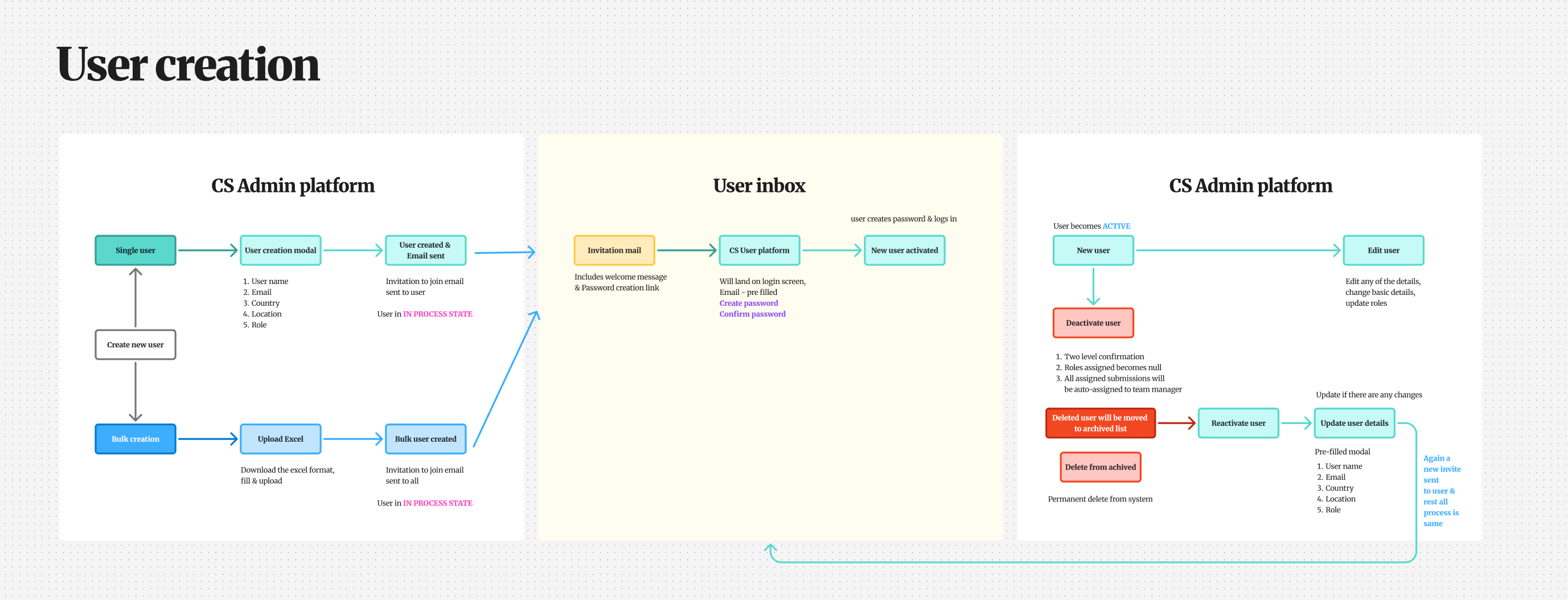
Add users one by one, or in bulk. For bulk, the admin downloads a spreadsheet template, fills it in and uploads it.
Principle
Match the tool to the size of the job.
Download templateFill it inUpload
Week two
A new role is almost the same as an existing one
Without this
Every role built from scratch, one permission at a time, with small mistakes creeping in.
What I designed
Duplicate a role, rename it and remove a few permissions. Head of Underwriting becomes Senior, then Junior, in minutes.
Principle
Make the second time faster than the first.
Head of UnderwritingDuplicateSenior UnderwriterDuplicateJunior Underwriter
Month two
Someone leaves the company
Without this
Their open submissions would sit with nobody, and a live deal could be missed.
What I designed
Their open work is never lost. If they were in a team, it goes to the team manager. If not, it goes to the admin, who reassigns it.
Principle
Nothing a person owned gets lost.
DCDeleted user
In a teamTeam manager
No teamAdmin
Month six
The company restructures and a role is removed
Without this
People would be left holding a role that no longer exists, with broken access.
What I designed
A pop-up shows everyone who holds the role. Once they are disconnected, they become Members until the admin gives them a new role.
Principle
No change happens silently.
Regional Lead
3 people hold this roleAlex MorganSam LeeRavi Kumar
Member
What these have in common
The happy path is the easy part. The design work is in the moments nobody plans for.
06 · The design
Roles, users and teams, screen by screen
Shown in the order an admin sets things up: roles first, because they are assigned when a user is created, then users, then teams.
How it shipped
1Phase 1Users
2Phase 2Roles, with updates to users
3Phase 3Teams
About 3 months from first phase to last.
Roles
Named and structured the client's way
Screen 1 · Roles list
Roles
4 roles · client-defined hierarchy
+ Create role
Junior Underwriter
12
Users
8
Permissions
Senior Underwriter
7
Users
14
Permissions
Underwriting Head
2
Users
19
Permissions
Clearance Specialist
3
Users
6
Permissions
Each role shows its users and permissions, so the admin can spot gaps before assigning anyone.
Screen 2 · Create role
Create role
Name a role and set its permissions once. Every assigned user inherits them.
Role name
Senior Underwriter
Description
Full quoting authority across assigned regions.
Submissions
Create submissions
Edit submissions
Delete submissions
Guidelines
View guidelines
Edit guidelines
Quote & Bind
Generate quotes
Bind policies
CancelCreate role
Permissions are set once on the role, and every user with that role gets them.
Users
Add, manage and check every user, without us
Screen 3 · Users list
Users
24 users · 5 regions · 3 teams
+ Add user
Search usersFilters
Name
Email
Role
Region
Team
Status
AMAlex Morgan
alex.morgan@client.com
Senior Underwriter
EMEA
London Desk
Active
PNPriya Nair
priya.nair@client.com
Underwriting Head
APAC
Singapore Desk
Active
DCDaniel Cho
daniel.cho@client.com
Junior Underwriter
Americas
New York Desk
Invited
SRSofia Rossi
sofia.rossi@client.com
Clearance Specialist
EMEA
London Desk
Inactive
Role, region, team and status in one table, so the admin can find anyone without opening profiles.
Screen 4 · Add user
Add user
Create and assign a user in one step.
Full name
Jordan Avery
Email
jordan.avery@client.com
Region
EMEA
Country
UK
Role
Sr. UW
Team
London Desk
CancelCreate user
Region and country are captured here, which later lets teams and submissions be filtered by location.
Screen 5 · User profile
AM
Alex Morgan
Senior UnderwriterEMEA
Account details
Emailalex.morgan@client.com
CountryUnited Kingdom
TeamLondon Desk
StatusActive
Permissions
Create submissions
Edit guidelines
Quote & bind
Manage team
View analytics
Every user's access can be checked by the client admin, without asking our team.
Teams
Teams built around how each client works
Screen 6 · Teams list
Teams
3 teams · 3 regions
+ Create team
London Desk
Manager · Priya Nair
8 membersEMEA12 active submissions
Singapore Desk
Manager · Marcus Tan
6 membersAPAC9 active submissions
New York Desk
Manager · Elena Vasquez
10 membersAmericas15 active submissions
Manager, region and workload per team, so the admin can see where work is piling up.
Screen 7 · Create team
Create team
Build a team around geography and assign its manager.
Team name
London Desk
Region
EMEA
Assign manager
Priya Nair
Add members
Alex MorganSofia RossiDaniel Cho+ Add more
CancelCreate team
Teams can follow any split the client uses, such as region or branch.
Screen 8 · Team members
London DeskEMEAPNPriya Nair · Manager
MembersSubmissions
+ Add member
Name
Role
Status
AMAlex Morgan
Senior Underwriter
Active
Remove
SRSofia Rossi
Clearance Specialist
Active
Remove
DCDaniel Cho
Junior Underwriter
Invited
Remove
The team manager runs the roster, so the admin does not step in for every change.
Screen 9 · Team submissions
London DeskEMEAPNPriya Nair · Manager
MembersSubmissions
Submission
Insured
Stage
Assigned to
SUB-20451
Meridian Airways
UW Review
Alex Morgan
SUB-20448
Pacific Air Co
Quoted
Alex Morgan
SUB-20439
Atlantic Shippers
Bound
Sofia Rossi
SUB-20431
Northern Freight
UW Review
Daniel Cho
Each team only sees its own work, with no noise from other regions.
07 · My contribution
One flow I added that no one asked for
Inline reassignment on delete
Problem
Deleting a user blocked until their work was manually reassigned elsewhere. A broken, multi-step dead end.
Decision
Brought reassignment inside the delete flow. The system surfaces active submissions and prompts inline reassignment before confirming deletion.
Outcome
One guided flow handles both tasks, reassign and delete, without leaving the page.
Delete confirmation · inline reassignment
Delete user · Daniel Cho
This user has 3 active submissions. Reassign before deleting.
SUB-20431 · Northern Freight
UW Review · $1.0M
Reassign to
SUB-20425 · Coastal Lines
Quoted · $850K
AMAlex Morgan
SUB-20419 · Summit Cargo
UW Review · $1.2M
Reassign to
CancelReassign & Delete
Reassignment lives inside the delete flow, so one action completes both tasks.
08 · Results
Did it pass the four tests?
In section 03, I set four tests for the module. Here is how it did.
Clients change things themselves
Client admins now create users, roles, permissions and teams on their own. Our admin's job at onboarding shrank to one step: creating the client's first admin.
Every client works their own way
Clients name their own roles, split them into sub-roles, build teams by branch or region, and add more admins for their locations.
No engineers in the loop
Creating users, changing roles and permissions, and assigning teams used to be engineering tasks. Now they are settings the client controls. Tickets that still reach engineers are bugs, not setup requests.
One module for every line
The same module runs across all 5 lines of business, for every client.
By the numbers
A week to minutes
for a role or permission change (estimate)
1
step for our team when a new client joins
2
starter roles, so no one is blocked on day one
4
levels of control, from super admin to team member
5
lines of business on one module
09 · What this taught me
Designing generic systems is the hardest UX work
1
Generic systems need invisible flexibility
It has to work for every client without feeling built for someone else. That takes ruthless abstraction and thoughtful defaults.
2
Requirements don't design themselves
The inner details weren't in any brief. They came from understanding what a manager actually needs to do their job.
3
Critical flows must respect user intent
The admin wants to delete, so the flow helps them do it safely instead of standing in the way.
4
Data collected early pays dividends later
Region and country at creation felt minor. They became essential for smart team filtering down the line.
Systems design note
I designed this system so it would not need changing, however many new lines or clients join. For me, the real test of system design is how well it handles the cases you have not built yet.