Simpler than a notebook: a store app for a first-time user
A family-run cashew business tracked every sale in notebooks and WhatsApp photos. I designed and built an app that records each sale, updates stock automatically, and gives the owners a live view of their store.
My scope: research, design and build, for web and mobile
A store the owners could not see
A husband and wife run a cashew manufacturing business and a retail store, alongside their full-time jobs. Store staff wrote every sale by hand.
- Husband and wife owners
- Full-time jobs alongside
- Manufacturing and retail
- 1A sale is made
- 2Written in a notebook
- 3Photographed
- Not delivered4Sent on WhatsApp
- 5The owners
When photos arrived late, or not at all, a week's sales simply disappeared.
The real problem was not data entry. The owners had no way to know what was happening in their own store.
Two very different users, one app
The owners
Needed something powerful enough to change how the business runs.
The storekeeper
Had very little experience with computers. Needed something she would trust more than a pen, on day one, with no training.
Solving for one without the other would break adoption. I designed around the storekeeper's ceiling, not the owners' ambition. If she does not use it, the data never reaches them.
What I learned before designing anything
I spoke with the owners to understand who would use the app every day, and what the business really needed.
Designing for the person at the counter
One thing was clear early: the storekeeper would decide whether this app worked or failed.
The storekeeper
Runs the counter in a small-town store
If it takes longer than writing in the notebook, she will go back to the notebook.
- Computers
Very basic knowledge of computers and the internet.
For the appThe counter computer must feel as simple as a phone, with big buttons and few choices on screen.
Principle 1 - Needs help with
Online shopping, online transactions and most other apps. She usually asks someone to help.
For the appNo long forms, menus or multi-step flows. If a task needs help, it has failed.
Principle 2 - Comfortable with
WhatsApp, YouTube, simple Google Pay payments and basic browsing on her phone.
Three principles I designed by
Keep it simple
One clear action per screen, big tap targets and plain words.
Fewest taps possible
Every flow cut to the fewest steps. Too many taps and she would lose patience.
Nothing new to learn
The same simple card-and-tap pattern on every screen, so learning one screen means knowing them all.
They asked for a sales record. The business needed more.
While learning how the store ran, I spotted gaps the owners had not mentioned. Each one was a chance for the app to do more than record sales, and actually help the business grow.
Running low
Stock ran out without warning, sometimes while a customer was waiting.
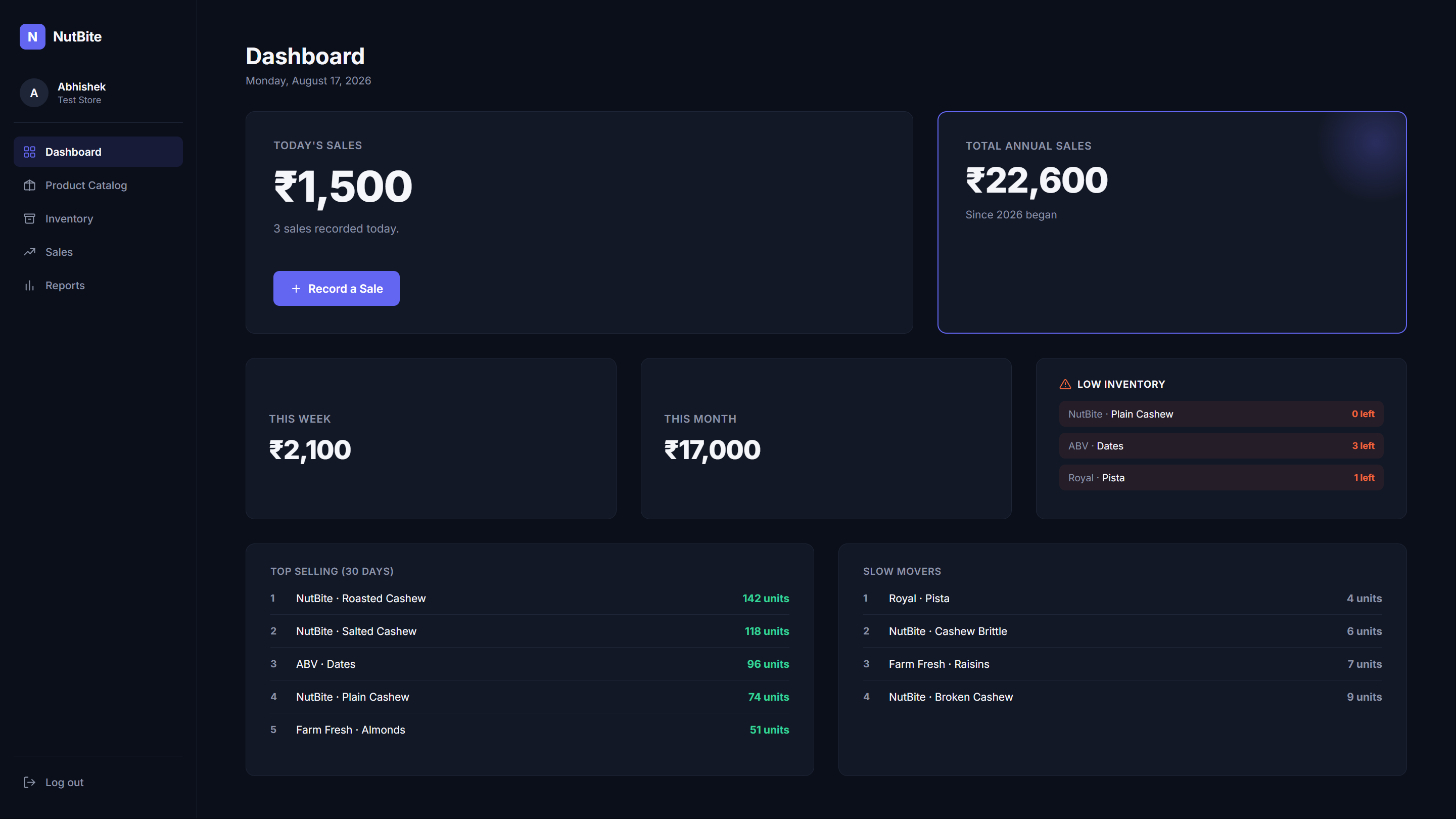
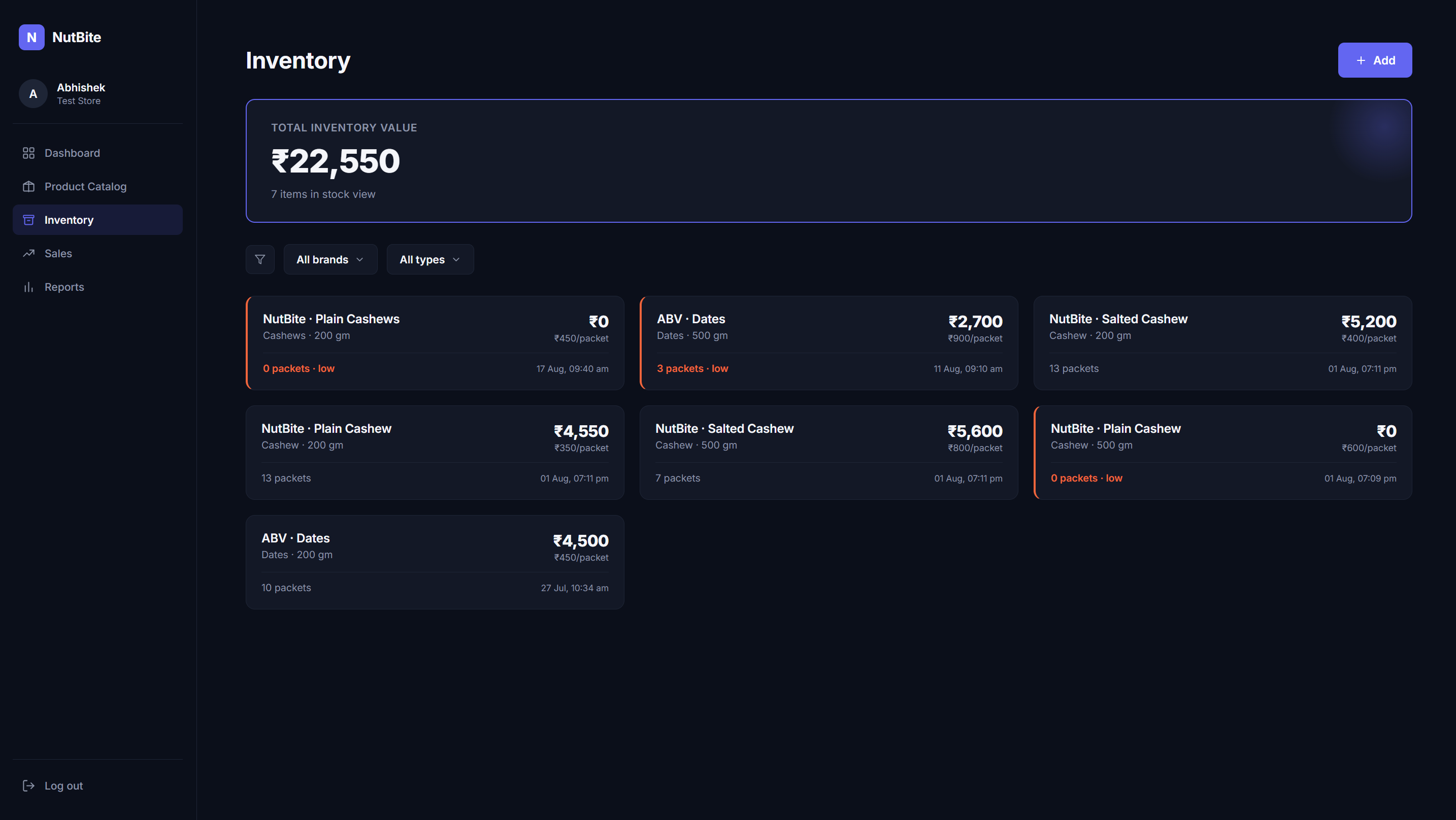
Flags products before they run out.
Fewer lost sales at the counter.
What sells, and what does not
Stock was bought from habit and memory. Slow movers sat on the shelf while best sellers ran short.
Shows the top sellers and the slow movers.
Buy more of what sells, less of what does not, and keep less money tied up in unwanted stock.
Sales reports
The owners only had time to review the business once a month, on a weekend.
Weekly, monthly and yearly reports, ready any time.
A clear picture of the shop without spending a weekend on it.
A bill for every sale
Customers left without a proper bill.
Every recorded sale creates a bill that can be downloaded and printed in one step. I designed the bill template, filled in automatically from the sale.
A small store that looks and runs like an organised brand.
How the owners responded
I shared the whole concept with the owners before building. They liked it enough to invest in a computer and a printer for the counter, so billing could be part of the app from day one.
What the app had to do
From these findings, I set five tests the app had to pass.
- 1Simpler than a notebook
- The storekeeper should use it on day one, with no training and the fewest taps.
- 2Every sale reaches the owners
- Each sale should reach the owners the moment it happens, with no photos to send.
- 3The whole store at a glance
- The owners should see sales, stock and reports any time, from anywhere.
- 4Know the stock
- The app should show what is running low, what sells and what does not.
- 5A bill for every sale
- Every sale should produce a printed bill, automatically.
From wireframes to decisions
I wireframed every screen in FigJam first, testing each one against the storekeeper's needs before building anything.
From my desk
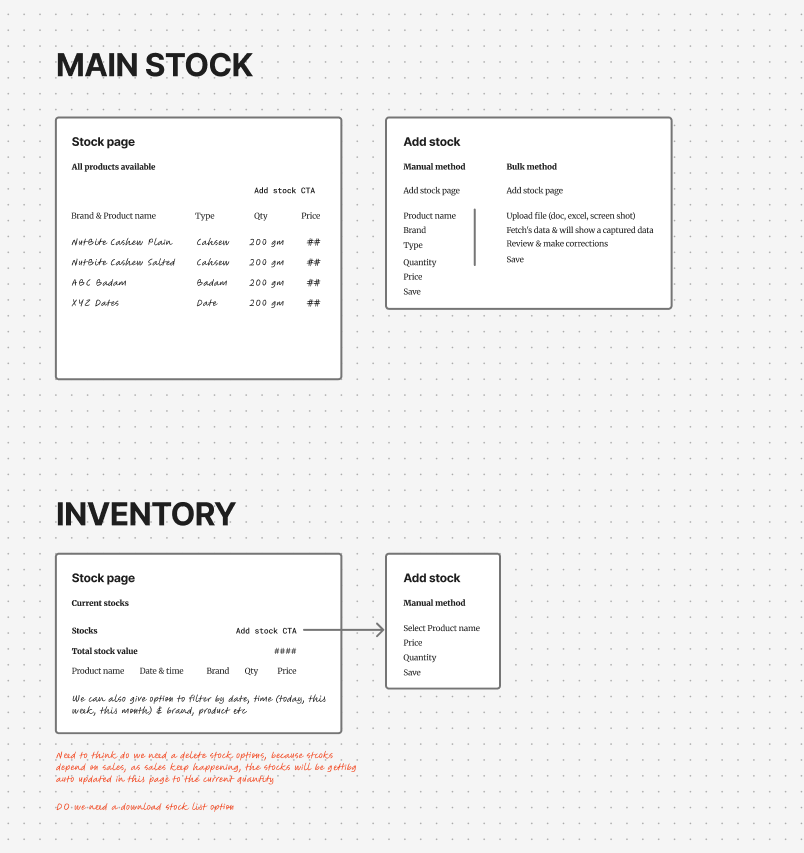
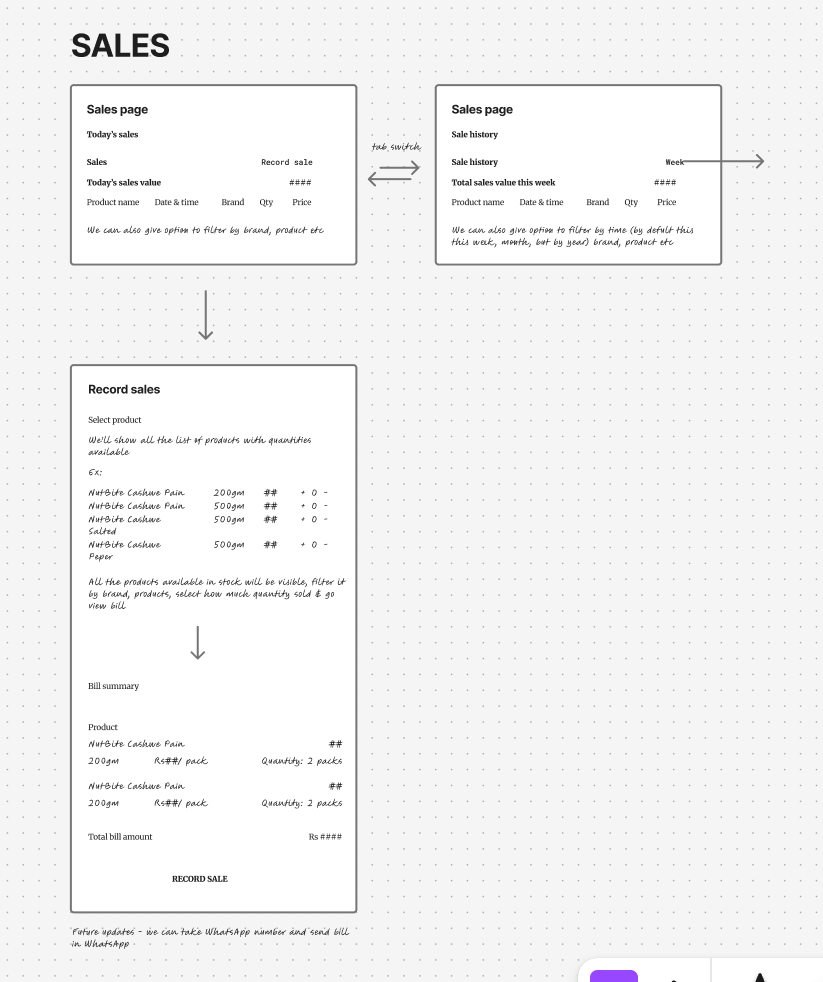
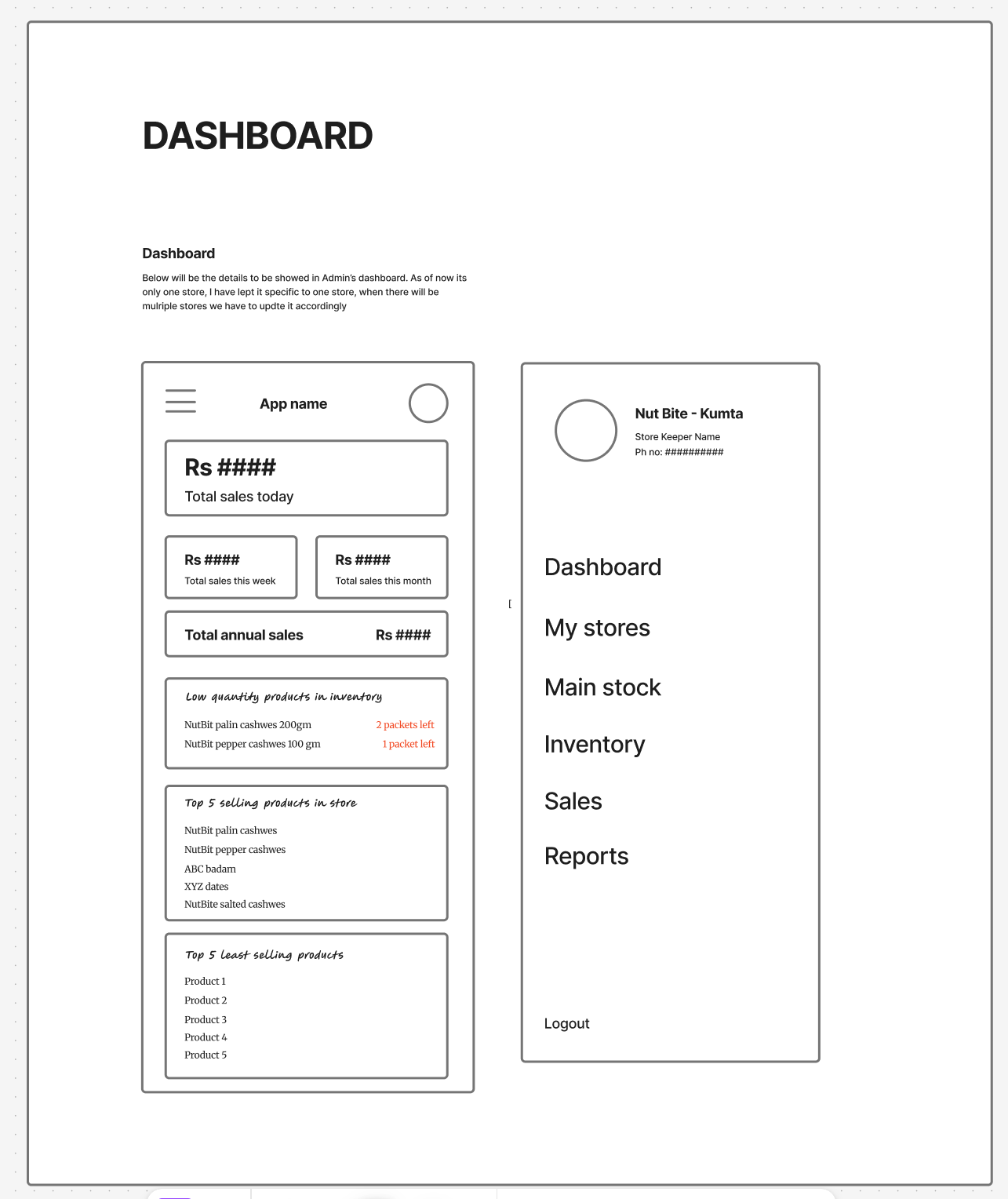
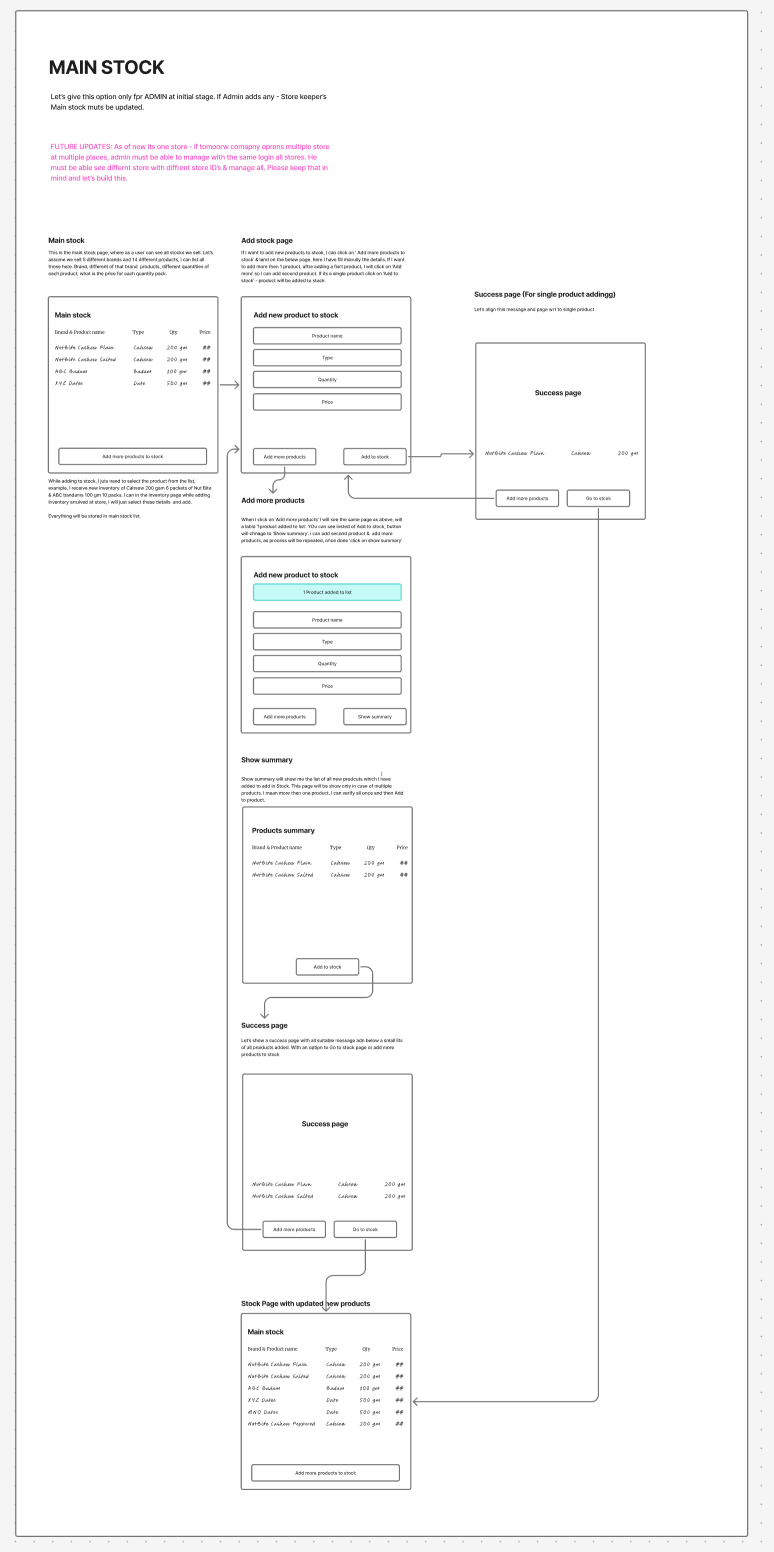
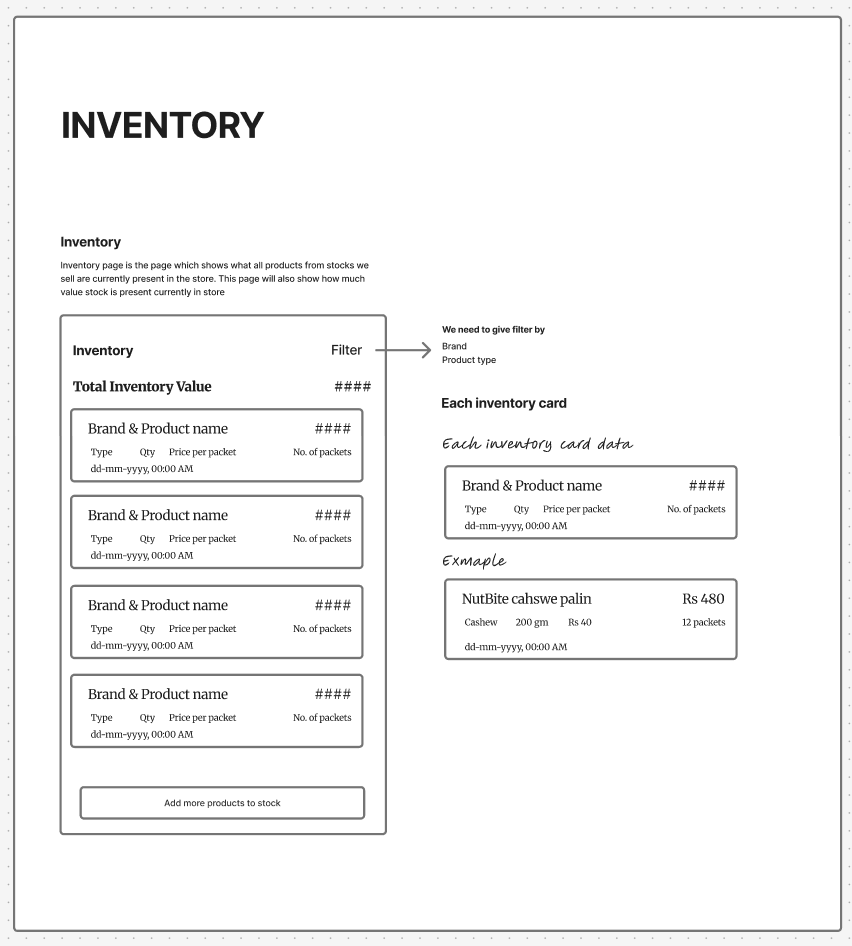
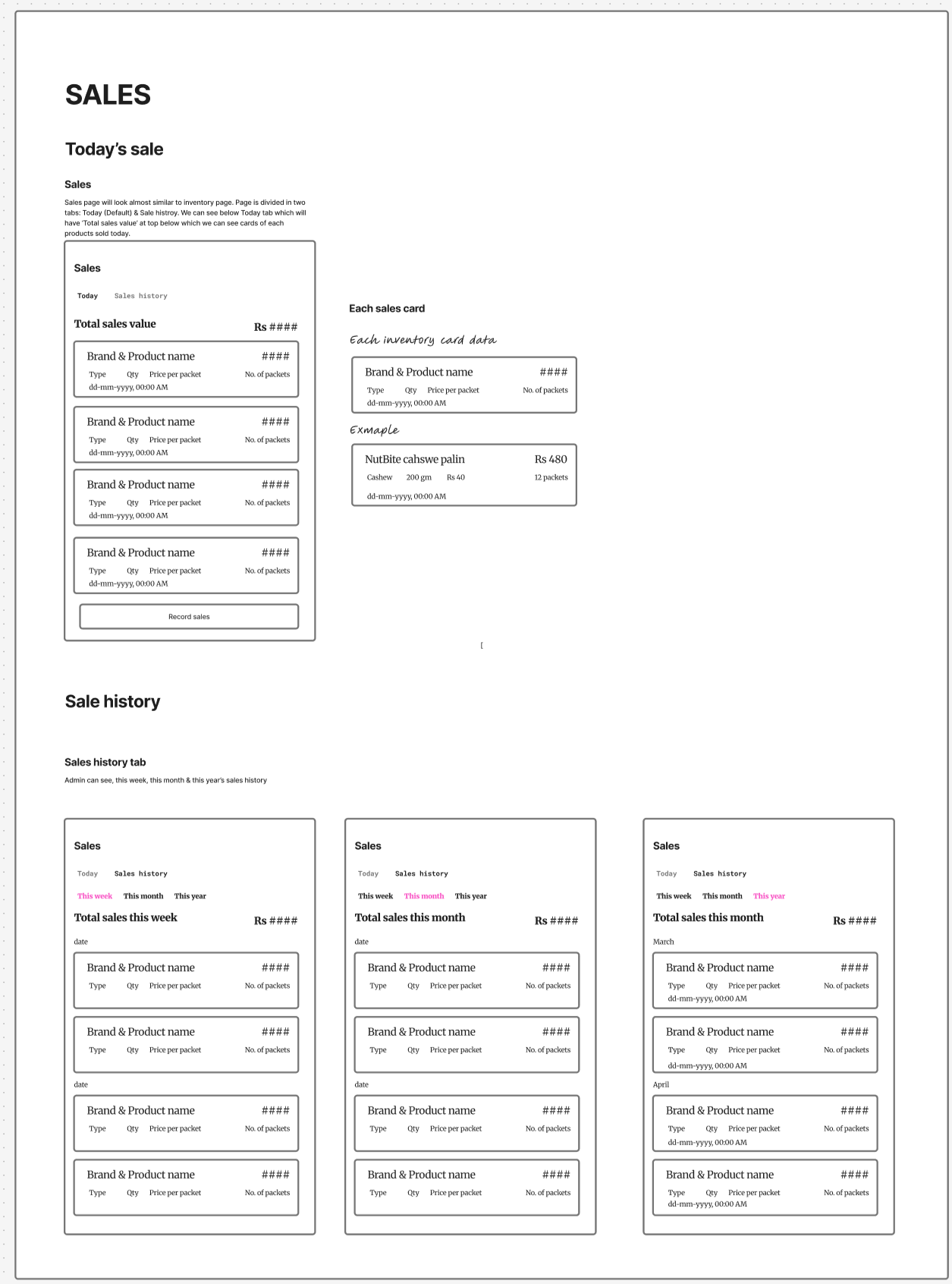
Low-fi wireframes of each screen, made in FigJam. Click any one to see it in full.
Five decisions that shaped the app
The catalogue came before any screen
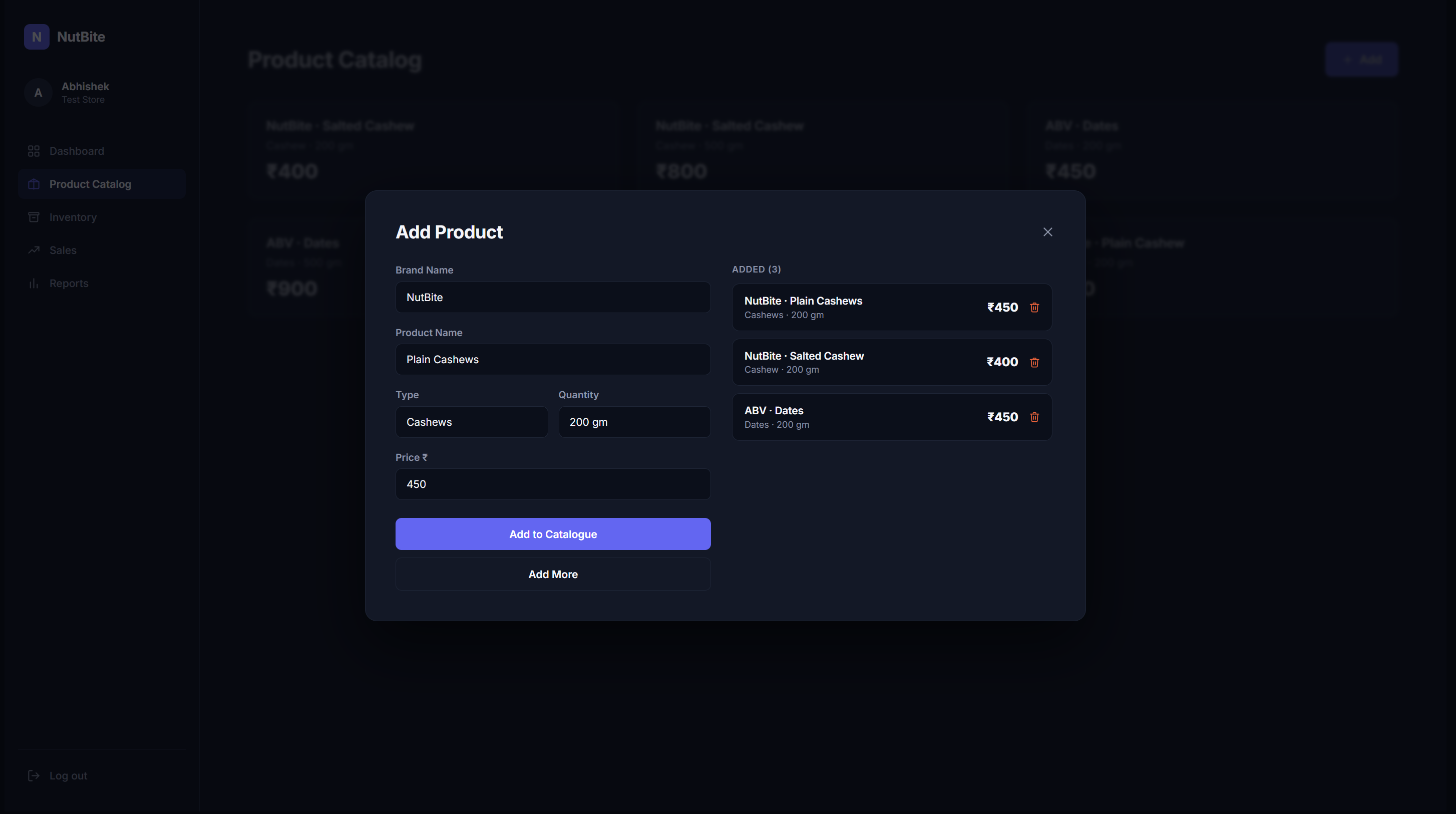
I built the Product Catalogue as the single source of truth: every brand, product, pack size, and price, defined once. Inventory, Sales, and Reports all read from it.
WhyGet this layer right and the storekeeper never types a product name or price again.
One pattern across every screen
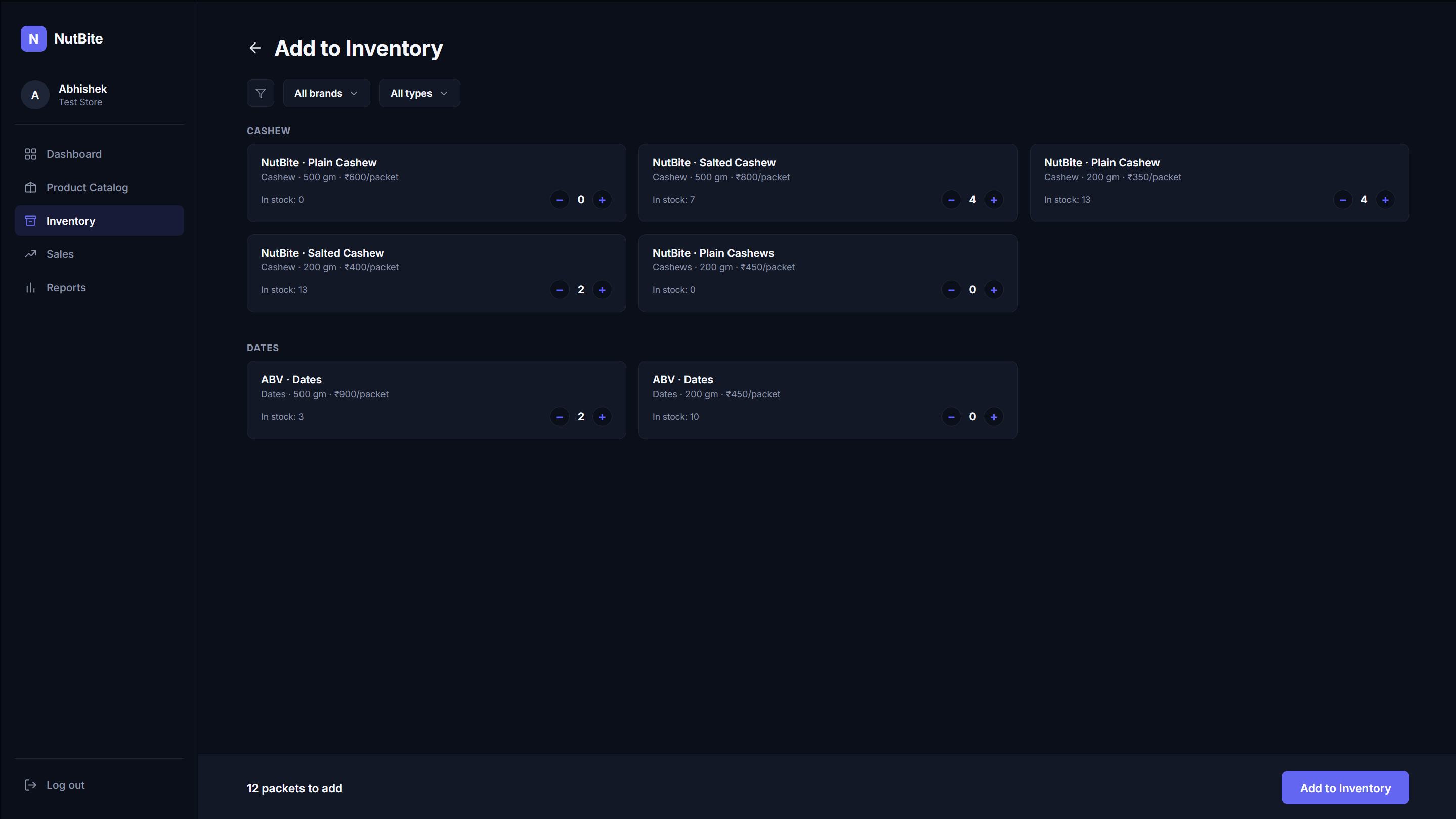
The same card-and-tap interaction repeats on Inventory and Sales. Nothing new to learn when moving between them.
WhyThe storekeeper had never used a business app. Learning one screen had to mean knowing them all. See principle 3 in the research findings.
Responsive on web and mobile
Built for both from the start, a deliberate call, not a default.
WhyThe storekeeper works at the counter computer, next to the printer. The owners have full-time jobs, so they check the store on their phones, from anywhere.
Owner actions sit behind a PIN
Pricing, catalogue edits, and reports are gated for owners only. Everything the storekeeper needs stays one tap away.
WhyTrust on day one mattered more than access: she could not break anything that mattered.
The bill comes out of the sale
Recording a sale fills in the bill automatically, ready to download and print.
WhyNo extra typing for the storekeeper, and every customer leaves with a proper bill.
One sale, from shelf to report
How the whole app works together, from setting up products to the owners checking their reports.
- 1Owner
Set up the catalogue
Every brand, product, pack size and price, entered once, behind the owner PIN.
- 2Store team
Add stock
New stock is added to the inventory from the catalogue, with no typing of names or prices.
- 3Storekeeper
Record a sale
Tap the products, set the quantity, confirm.
- 4Storekeeper
Print the bill
The bill is filled in from the sale, ready to download and print.
- 5App
Stock updates itself
Inventory drops automatically, and products running low are flagged.
- 6Owners
Check the dashboard
Today's sales and stock, live, from anywhere.
- 7Owners
Reports and top sellers
Weekly, monthly and yearly reports, plus what sells and what does not, to reorder wisely.
Reorder: back to step 2
Simplified screens, to show the journey.
From wireframe to a live app, built with AI
After wireframing in FigJam, I skipped the usual high-fidelity design stage. I turned each wireframe and requirement into a prompt, built the full working app myself with Claude Design, then took it live and handed it to the client.
- 1
Wireframe
Low-fi screens in FigJam, from the process section
- 2
Design system
Colours, type and components fixed before building
- 3
Prompts
Every sketch and requirement written as a clear prompt
- 4
Build
Claude Design turned each prompt into working screens, using the design system
Review and refine: back to step 3 - 5
Go live
Code pushed to GitHub and deployed as a live app
- 6
Hand over
Handed to the client, now in daily use at the store
The design system I set first
Colours
- Background
#0b0f1a - Surface
#131826 - Border
#1e2536 - Primary
#6366f4 - Text
#f5f6fa - Muted text
#8b93a7 - Alert
#f04b2c - Success
#27d399
Type
Inter
Components
Colours sampled from the NutBite app screens. Fixed before the first prompt, so every screen came out consistent.
One of the prompts
Build the Record Sales page for NutBite, a web app for a small store. - Page title "Record Sales" with a back arrow.- A summary card at the top: [packets selected] on the left, [total sale] on the right.- Two filters: All brands, All types.- Products grouped by type, e.g. [Type 1], [Type 2]. Each product card shows: [brand] · [product name] [type] · [pack size] · [price per packet] Available: [stock count] and a minus / [quantity] / plus control.- A bar fixed at the bottom: "[packets] packets · ₹[total]" and a "Record Sales" button.- Keep the left sidebar: Dashboard, Product Catalog, Inventory, Sales, Reports.- Big tap targets, plain words. Use the NutBite design system.Each prompt carried a wireframe, a requirement and the design system.
What this shows
The thinking stayed mine: the research, the decisions, the sketches and the design system. AI turned them into working code. One designer took a real business from notebook to live app, without a separate development team.
Every screen replaced a page in a notebook
Record a sale, and stock, revenue and reports update on their own.
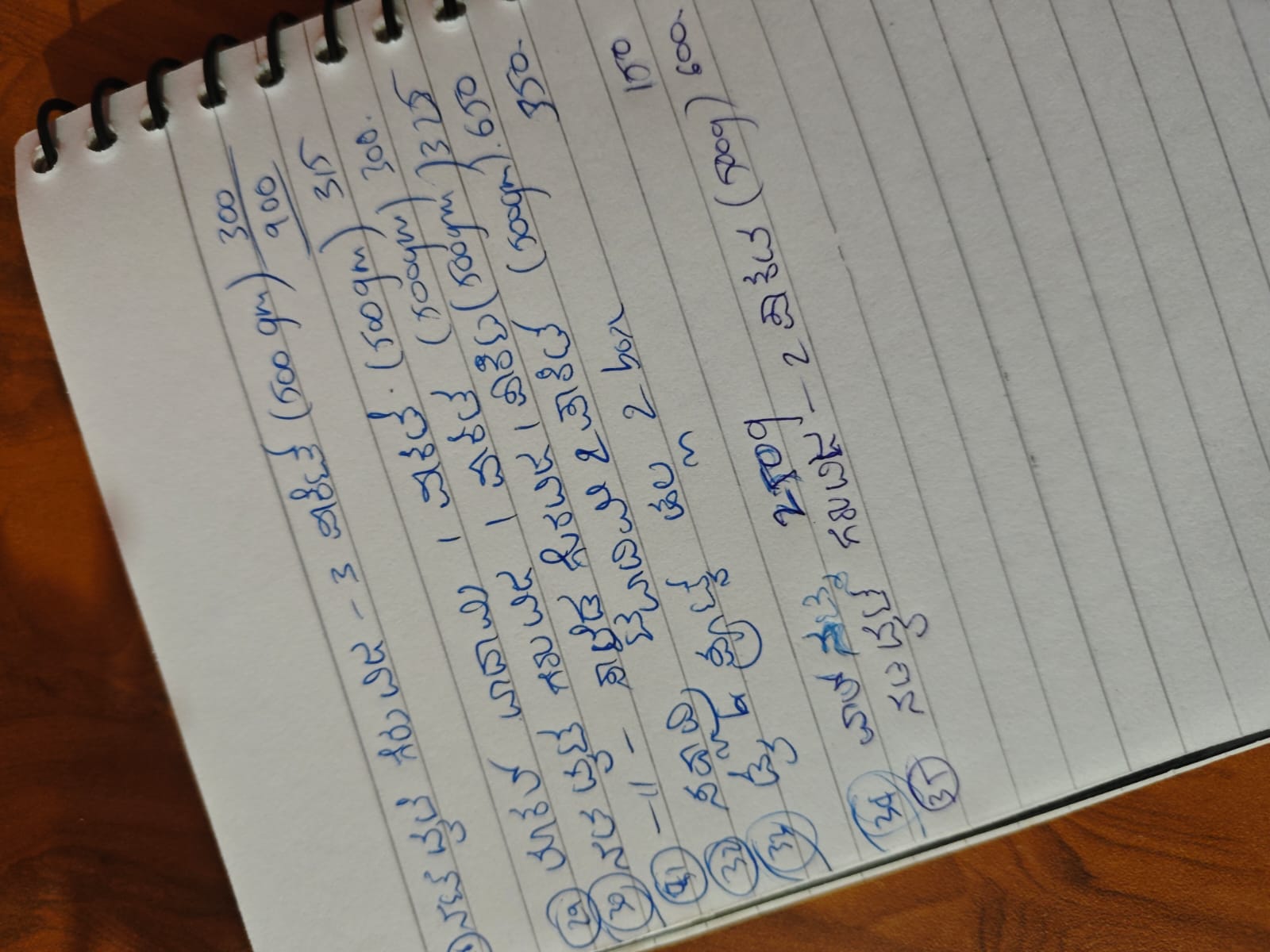
A real page from the store's sales notebook, shared with the owners' permission.
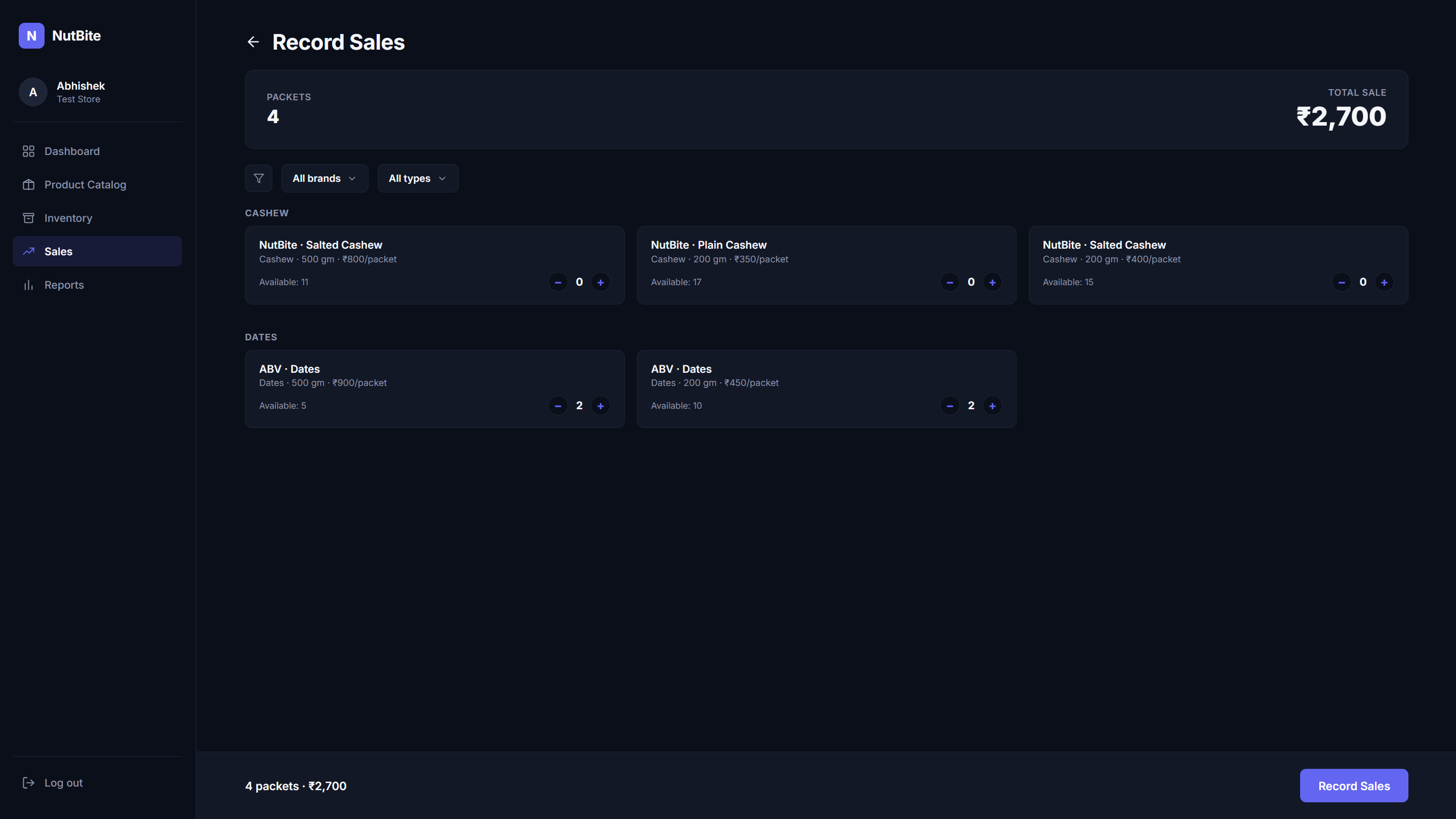
Same task, minus the memory and the missing photos
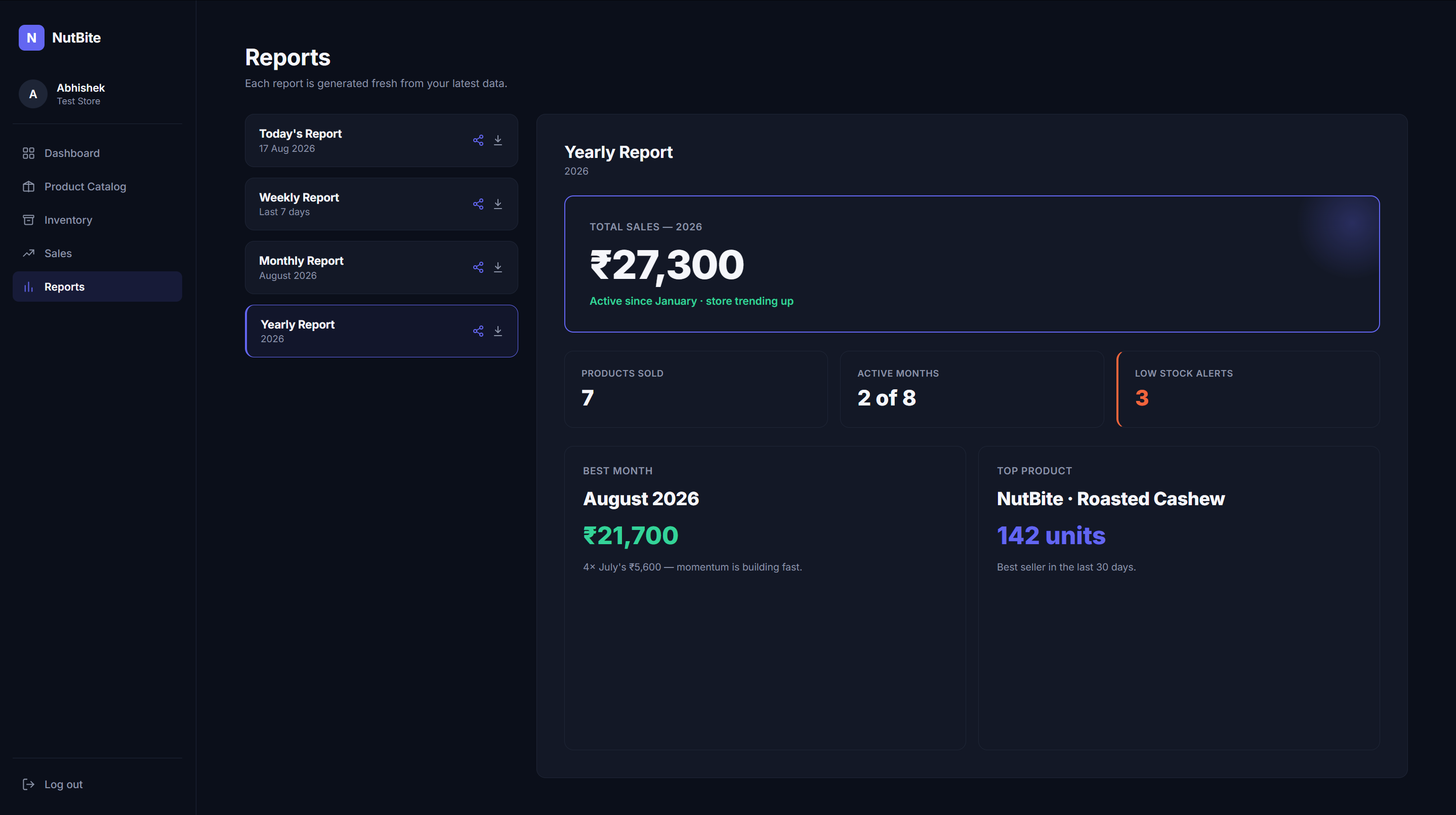
They asked for a sales record. Here is what they got.
* Results as reported by the owners, from their first two months using the app.
The five tests from section 03
1Simpler than a notebook
Used from day one at the counter.
2Every sale reaches the owners
Every sale logs itself the moment it happens.
3The whole store at a glance
Sales, stock and reports, any time.
4Know the stock
Low stock flagged, top sellers and slow movers shown.
5A bill for every sale
Every sale prints a bill in one step.
We've gone from feeling like a normal store to a serious brand in our town. No more forgetting to write things down, take a photo, and send it on WhatsApp. Everything happens automatically. I just have to operate it.
NutBite Store, Owners
Real clients carry real weight
This was a real business with real money. Every decision I made had a real effect, and I had to stand behind it.
The brief is where you start, not where you stop
They asked for a way to record sales, and I gave them that. I also added stock alerts, top sellers, reports and printed bills, because a good tool should leave the business better than before.